How to Build a Follow-Up Radar for Sales Teams
Every inbox has threads that fell through the cracks. Find the threads waiting on your users and the questions nobody answered, and route them where your team works.

3 min read

Every inbox has threads that fell through the cracks. A prospect asked a question that never got answered. A proposal went out and nobody followed up when the reply didn’t come. A concern got raised in a side-thread and the conversation moved on without addressing it.
The problem isn’t that reps don’t care. The problem is that email has no concept of “who’s the ball with.” There’s no way to query “threads waiting on me” or “questions I never answered.” iGPT’s API can classify every stale thread into three categories, tell your users exactly what needs attention, and feed the results into Slack, your CRM, or a dashboard.
Here’s the setup.
What the radar distinguishes
A useful follow-up feature needs to classify threads into three types, because each one triggers a different action.
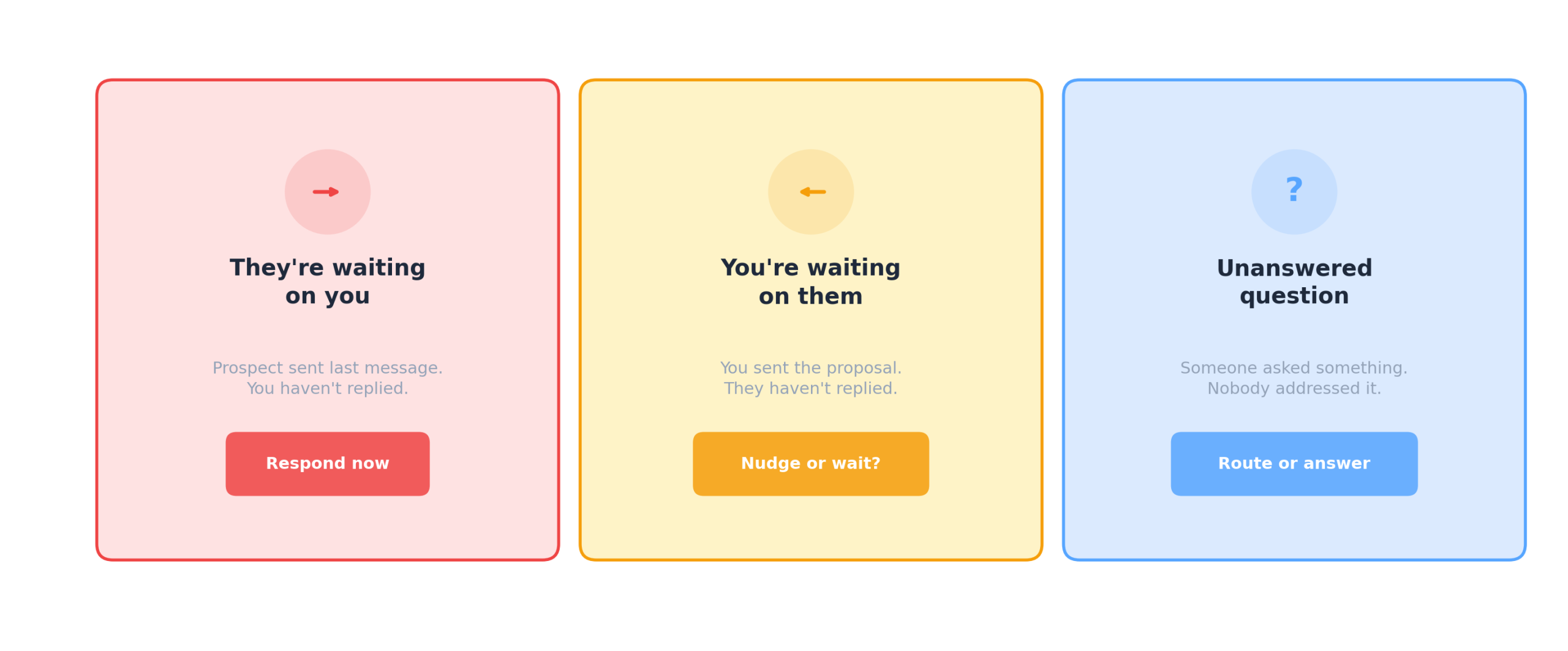
The classification depends on who sent the last message, whether it contained a question, and whether subsequent messages addressed it. Raw email APIs give you messages sorted by date. They don’t encode reply direction, and they can’t distinguish a concerning silence from a normal response window. iGPT handles thread reconstruction, reply direction, and per-contact cadence analysis upstream during indexing.
Setup
Get an API key at igpt.ai/hub/apikeys and install the SDK:
export IGPT_API_KEY=your_key_hereConnect a user’s inbox:
import os
from igpt import IGPT

igpt = IGPT(api_key=os.getenv("IGPT_API_KEY"))

res = igpt.connectors.authorize(
    user="rep_user_id",
    service="spike",
    scope="messages"
)

print("Authorize at:", res.get("url"))
Run:
igpt = IGPT(
    api_key=os.getenv("IGPT_API_KEY"),
    user="rep_user_id"
)

response = igpt.recall.ask(
    input=(
        "Which conversations need follow-up? "
        "Distinguish between threads waiting on me, "
        "threads I'm waiting on, and unanswered questions."
    ),
    quality="cef-1-high",
    output_format="json"
)
The output classifies each stale thread with contact, account, what they’re waiting on, how long it’s been, and urgency calibrated to each contact’s normal response cadence. Sarah Kim flagging as high urgency after 11 days makes sense because previous exchanges with her were same-day. The same gap from a contact who always takes two weeks would flag as medium.
Where to route the output
The type field drives your product’s UX. A few patterns that work well:
8 AM Slack digest. Push each rep’s they_are_waiting items to their DM. They start the day knowing exactly who needs a response and what the question was, instead of spending 30 minutes reconstructing what they dropped.
CRM task creation. Write they_are_waiting items into Salesforce or HubSpot as follow-up tasks with the contact name, the specific question, and the number of days waiting. The rep has context to respond without re-reading the thread.
Manager view. Surface results by rep on a team dashboard. Managers see which conversations are stale across the team without asking for self-reported status.
CS escalation. Set a threshold: any customer-facing they_are_waiting item over 14 days triggers an alert to the CS lead. Customers who feel ignored don’t always complain. They stop replying.
Nudge queue. The we_are_waiting items power a queue that tells reps which stalled threads deserve a follow-up and which are still within the normal response window. The nudge/wait decision is made using temporal pattern data the rep can’t compute from their inbox.
Related use cases
The same API powers adjacent features with different prompts:
Deal risk detection. “What friction or risk signals exist in my active deals?” surfaces converging patterns (engagement drops + unanswered objections + competitor mentions) that predict deals going dark. See how to detect deal risk from email patterns.
Commitment tracker. “What have I promised to send or do this week?” matches promises against follow-through and flags what’s overdue.
Account health. “What’s the engagement trend across my top 10 accounts over 30 days?” shows which relationships are warming and which are cooling.
Try it at igpt.ai/hub/playground. Connect through MCP at mcp.igpt.ai for Claude, Cursor, or any MCP-compatible agent framework.


